> ## Documentation Index
> Fetch the complete documentation index at: https://docs.pelanor.io/llms.txt
> Use this file to discover all available pages before exploring further.
# Cost Allocation Strategies
> Learn how to allocate shared costs between dimensions, or distribute them within cloud scopes, using the Cost Allocation Strategies module.
# Pelanor Cost Allocation Strategies
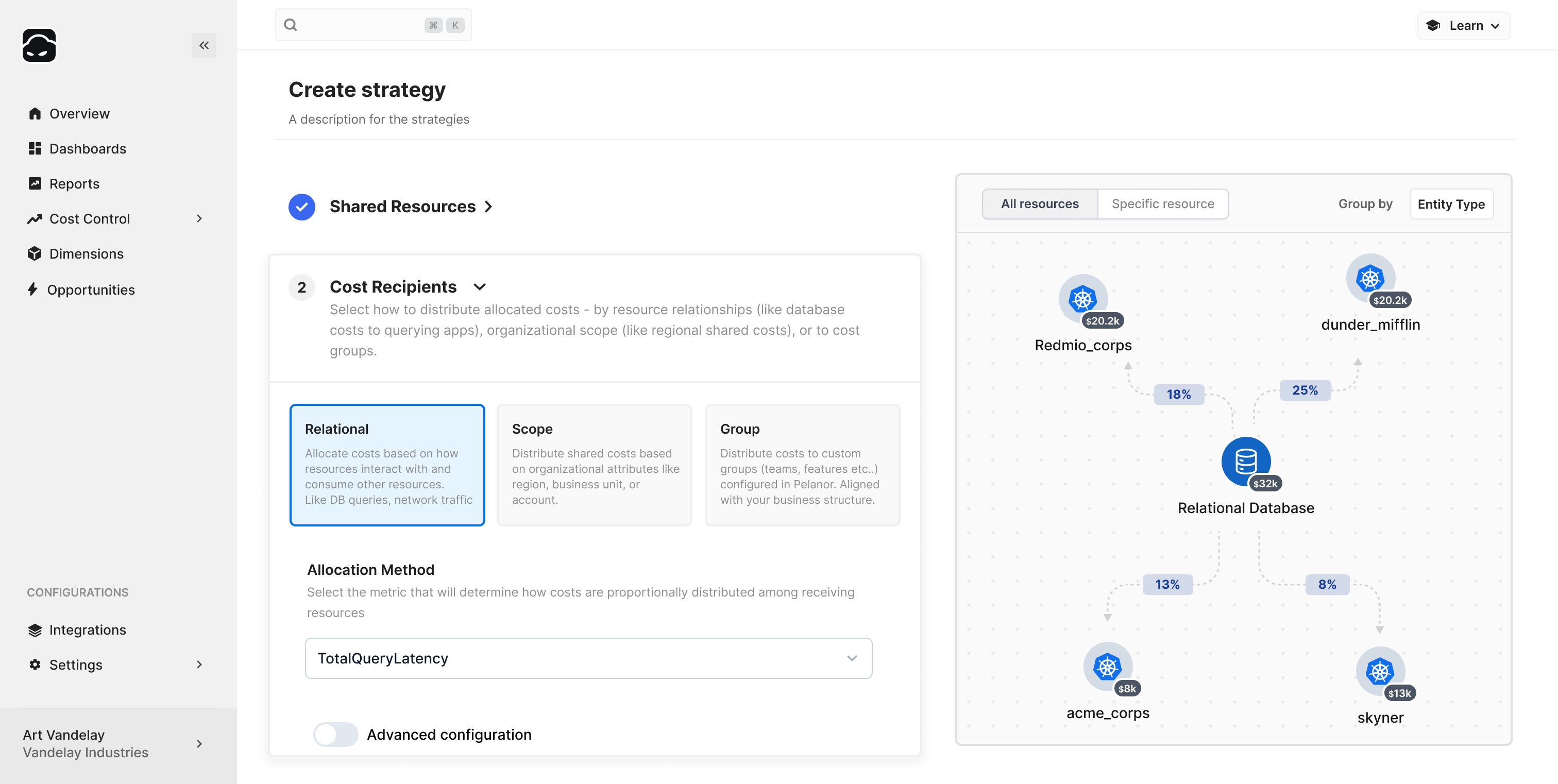 ## Cost Allocation Strategies Overview
Cost Allocation Strategies (CAS) in Pelanor let you distribute shared costs across the dimensions that matter to your business. Typical uses include:
* Splitting recurring CSP costs (licensing, support fees) evenly across departments
* Allocating shared networking costs to product lines based on proportional usage
* Spreading data-warehouse costs to departments by query volume or runtime
Once activated, CAS adjustments appear in every report and dashboard.
## Viewing and Editing Cost Allocation Strategies
## Cost Allocation Strategies Overview
Cost Allocation Strategies (CAS) in Pelanor let you distribute shared costs across the dimensions that matter to your business. Typical uses include:
* Splitting recurring CSP costs (licensing, support fees) evenly across departments
* Allocating shared networking costs to product lines based on proportional usage
* Spreading data-warehouse costs to departments by query volume or runtime
Once activated, CAS adjustments appear in every report and dashboard.
## Viewing and Editing Cost Allocation Strategies
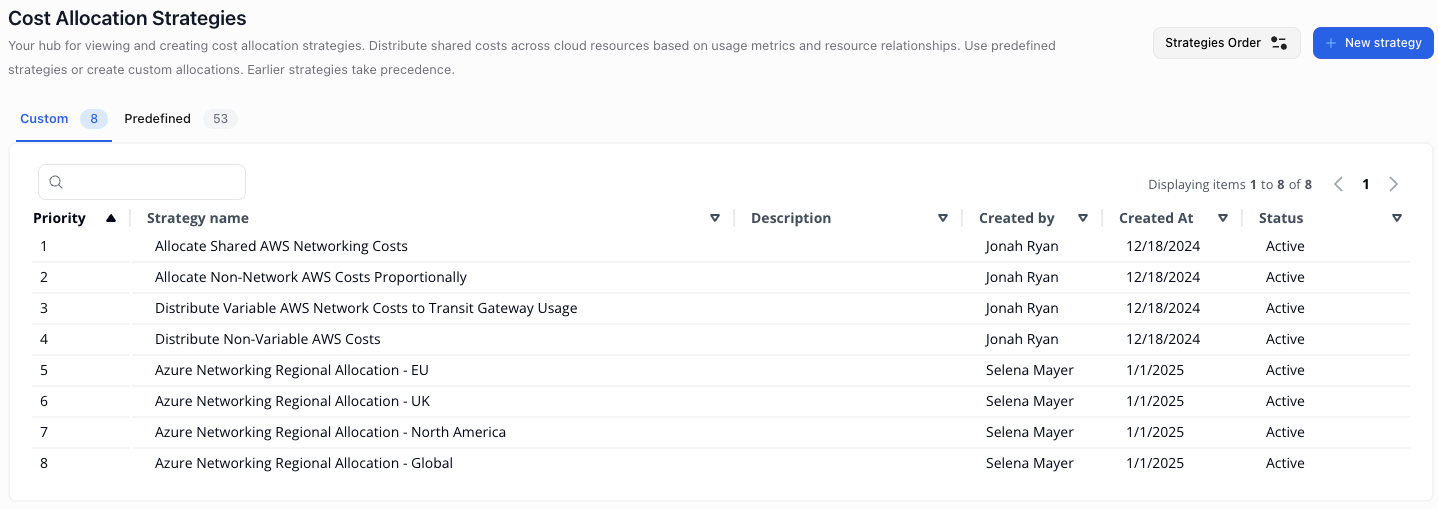 If you’re inside a specific workspace, only that workspace’s strategies appear. Switch to the **Default Workspace** to view or edit cross-workspace strategies. See *Workspaces and User Management* for details on role-based access.
Open **Settings → Cost Allocation Strategies** to manage strategies.
## Custom vs. Predefined Strategies
| Type | Description |
| -------------- | -------------------------------------------------------------------------------------- |
| **Predefined** | Maintained by Pelanor to handle nested entities (e.g., databases → VMs). Read-only. |
| **Custom** | Created by users with **Admin** / **Workspace Admin** roles. All others are read-only. |
## Strategy Execution Order
Strategies run top-to-bottom. Re-order them using **Strategies Order**.
Example:
1. **Distribute Specific Network Costs by Usage** – allocate VPC/ELB costs to departments
2. **Allocate Remaining Costs Equally** – split licensing/support fees among departments
Reversing the order changes the outcome and may distort allocations.
## Allocation Types
Pelanor supports three types of cost allocation:
### Segment Allocation (most common)
Splits costs to custom dimension segments (e.g., departments, product lines).
**When to use:**
* You need a high-level breakdown by org units
* Simplicity is more important than fine-grained accuracy
**Example:** Three product lines share resources; costs are split proportionally.
**Key parameters:**
| Setting | Notes |
| --------------------- | ------------------------------------------------ |
| **Allocation Method** | **Proportional**, **Fixed**, or **Metric-based** |
| **Dimension** | Dimension whose segments receive the allocation |
***
### Relational Allocation
Maps costs among interdependent resources (e.g., DB costs to workloads).
**When to use:**
* You need usage-based splits that follow cross-service relationships
**Example:** A database serves 3 workloads → split costs by query count.
**Key parameter:**
* **Filter** *(optional)* – limits the source cost pool
***
### Scope Allocation
Allocates costs by cloud scopes: Billing Account, Subaccount, Region, AZ.
**When to use:**
* You need visibility by infra/geography rather than business team
**Example:** Break down costs per region to surface hot zones
**Key parameters:**
| Setting | Notes |
| ----------------------- | --------------------------------------- |
| **Distribution Scope** | Billing Account, Subaccount, AZ, Region |
| **Allocation Metric** | Determines how costs are proportioned |
| **Filter** *(optional)* | Restricts source costs |
***
## Creating a Cost Allocation Strategy
If you’re inside a specific workspace, only that workspace’s strategies appear. Switch to the **Default Workspace** to view or edit cross-workspace strategies. See *Workspaces and User Management* for details on role-based access.
Open **Settings → Cost Allocation Strategies** to manage strategies.
## Custom vs. Predefined Strategies
| Type | Description |
| -------------- | -------------------------------------------------------------------------------------- |
| **Predefined** | Maintained by Pelanor to handle nested entities (e.g., databases → VMs). Read-only. |
| **Custom** | Created by users with **Admin** / **Workspace Admin** roles. All others are read-only. |
## Strategy Execution Order
Strategies run top-to-bottom. Re-order them using **Strategies Order**.
Example:
1. **Distribute Specific Network Costs by Usage** – allocate VPC/ELB costs to departments
2. **Allocate Remaining Costs Equally** – split licensing/support fees among departments
Reversing the order changes the outcome and may distort allocations.
## Allocation Types
Pelanor supports three types of cost allocation:
### Segment Allocation (most common)
Splits costs to custom dimension segments (e.g., departments, product lines).
**When to use:**
* You need a high-level breakdown by org units
* Simplicity is more important than fine-grained accuracy
**Example:** Three product lines share resources; costs are split proportionally.
**Key parameters:**
| Setting | Notes |
| --------------------- | ------------------------------------------------ |
| **Allocation Method** | **Proportional**, **Fixed**, or **Metric-based** |
| **Dimension** | Dimension whose segments receive the allocation |
***
### Relational Allocation
Maps costs among interdependent resources (e.g., DB costs to workloads).
**When to use:**
* You need usage-based splits that follow cross-service relationships
**Example:** A database serves 3 workloads → split costs by query count.
**Key parameter:**
* **Filter** *(optional)* – limits the source cost pool
***
### Scope Allocation
Allocates costs by cloud scopes: Billing Account, Subaccount, Region, AZ.
**When to use:**
* You need visibility by infra/geography rather than business team
**Example:** Break down costs per region to surface hot zones
**Key parameters:**
| Setting | Notes |
| ----------------------- | --------------------------------------- |
| **Distribution Scope** | Billing Account, Subaccount, AZ, Region |
| **Allocation Metric** | Determines how costs are proportioned |
| **Filter** *(optional)* | Restricts source costs |
***
## Creating a Cost Allocation Strategy
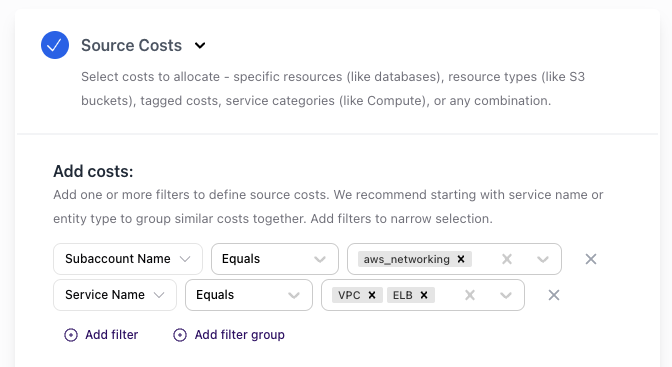 * **Select allocation conditions** – e.g., filter for `aws_networking`, `VPC`, `ELB`
* **Configure waste allocation** – default: *Include Unutilized Capacity*
* **Choose usage subcategories** – e.g., *Cross AZ Traffic*
* **Core vs. Associated** – use *Associated* unless it's baseline (e.g., control plane)
* **Select allocation conditions** – e.g., filter for `aws_networking`, `VPC`, `ELB`
* **Configure waste allocation** – default: *Include Unutilized Capacity*
* **Choose usage subcategories** – e.g., *Cross AZ Traffic*
* **Core vs. Associated** – use *Associated* unless it's baseline (e.g., control plane)
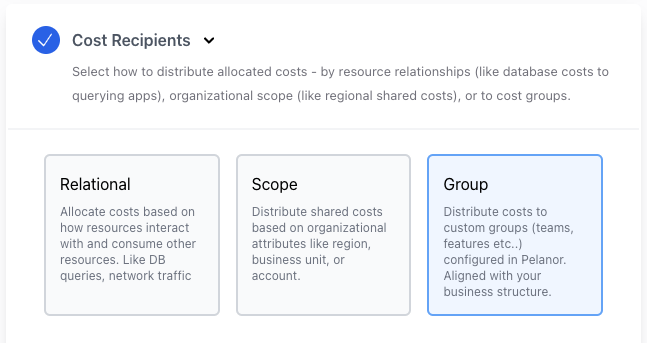 See *Allocation Types* section above for detailed explanations.
* **Select Allocation Type**
* **Choose Allocation Method**
* **Specify Parameters** – dimension, metric, or fixed shares
* Click **Simulate** to preview the resource graph and flows
* Click **Save** to activate
By following these steps, you’ll enable accurate and meaningful cost distribution across departments, product lines, or any custom dimension in your Pelanor environment.
See *Allocation Types* section above for detailed explanations.
* **Select Allocation Type**
* **Choose Allocation Method**
* **Specify Parameters** – dimension, metric, or fixed shares
* Click **Simulate** to preview the resource graph and flows
* Click **Save** to activate
By following these steps, you’ll enable accurate and meaningful cost distribution across departments, product lines, or any custom dimension in your Pelanor environment.