> ## Documentation Index
> Fetch the complete documentation index at: https://docs.pelanor.io/llms.txt
> Use this file to discover all available pages before exploring further.
# Custom Invoices
> Learn how to integrate cloud costs that aren't covered by Pelanor's built-in connectors.
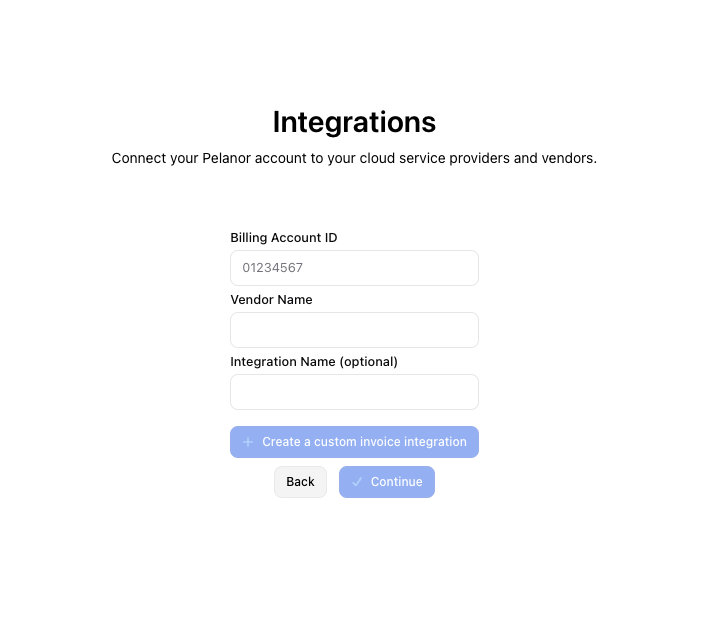 ## Integration Basics
* **One integration per billing account / org ID** – create a separate integration for each account
* Data appears in Pelanor dashboards within **≈ 12 hours** of upload
* New data for a given month **overwrites** any previous uploads for that month
## Integration Methods
1. **In-Platform Integration** – *coming soon*
2. **API Integration** – programmatic uploads\
[US API Docs](https://app.pelanor.io/api-docs) | [EU API Docs](https://app-eu.pelanor.io/api-docs)
***
## CSV Format Requirements
### Required fields
| Field | Description | Format |
| ------------ | ---------------------------- | ----------------- |
| `usage_date` | Date when the usage occurred | `YYYY-MM-DD` |
| `cost` | Cost in USD | Numeric (`12.50`) |
### Optional fields (improve data organisation)
| Field | Description | Shows as\* |
| ------------------- | ---------------------- | ------------------------ |
| `service_name` | Name of the service | vendor name |
| `usage_type` | Type of usage | `Custom` |
| `usage_subcategory` | Sub-category of usage | `Custom` |
| `usage_category` | Category of usage | `Custom` |
| `payment_kind` | Kind of payment | `On Demand` |
| `resource_id` | Resource identifier | `service_name` or vendor |
| `resource_name` | Friendly resource name | `service_name` or vendor |
| `subaccount` | Sub-account identifier | `None` |
| `tag:{key_name}` | Custom tags | *(not displayed)* |
| `region` | Region information | `None` |
| `availability_zone` | Availability Zone | `None` |
| `consumption` | Quantity consumed | — |
| `consumption_type` | Type of consumption † | `Other` |
† **Allowed `consumption_type` values**\
`Data Transferred`, `Data Processed`, `CPU Core Hours`, `Storage`, `Requests`, `Item Count`, `Usage Hours`, `Other`
\*“Shows as” indicates what appears in Pelanor if you omit the field.
***
## Creating Your CSV
Begin with **`usage_date`** and **`cost`** columns.
Add any other columns that improve your categorization and filtering.
Dates must use the `YYYY-MM-DD` format (e.g., `2025-05-01`).\
Costs must be numeric—don’t include currency symbols.
Save the file as a `.csv`.
***
## Data Validation
Pelanor verifies that:
* The file is valid CSV
* `usage_date` and `cost` are present
* Values follow expected formats
* `consumption_type` values (if included) are valid
If any issues are found, Pelanor returns a clear error so you can fix the file.
***
## After Integration
* Analyse these costs alongside your cloud providers
* Filter / group by any column you uploaded
* Build dashboards including custom-vendor spend
* Create alerts for unusual spending patterns
## Integration Basics
* **One integration per billing account / org ID** – create a separate integration for each account
* Data appears in Pelanor dashboards within **≈ 12 hours** of upload
* New data for a given month **overwrites** any previous uploads for that month
## Integration Methods
1. **In-Platform Integration** – *coming soon*
2. **API Integration** – programmatic uploads\
[US API Docs](https://app.pelanor.io/api-docs) | [EU API Docs](https://app-eu.pelanor.io/api-docs)
***
## CSV Format Requirements
### Required fields
| Field | Description | Format |
| ------------ | ---------------------------- | ----------------- |
| `usage_date` | Date when the usage occurred | `YYYY-MM-DD` |
| `cost` | Cost in USD | Numeric (`12.50`) |
### Optional fields (improve data organisation)
| Field | Description | Shows as\* |
| ------------------- | ---------------------- | ------------------------ |
| `service_name` | Name of the service | vendor name |
| `usage_type` | Type of usage | `Custom` |
| `usage_subcategory` | Sub-category of usage | `Custom` |
| `usage_category` | Category of usage | `Custom` |
| `payment_kind` | Kind of payment | `On Demand` |
| `resource_id` | Resource identifier | `service_name` or vendor |
| `resource_name` | Friendly resource name | `service_name` or vendor |
| `subaccount` | Sub-account identifier | `None` |
| `tag:{key_name}` | Custom tags | *(not displayed)* |
| `region` | Region information | `None` |
| `availability_zone` | Availability Zone | `None` |
| `consumption` | Quantity consumed | — |
| `consumption_type` | Type of consumption † | `Other` |
† **Allowed `consumption_type` values**\
`Data Transferred`, `Data Processed`, `CPU Core Hours`, `Storage`, `Requests`, `Item Count`, `Usage Hours`, `Other`
\*“Shows as” indicates what appears in Pelanor if you omit the field.
***
## Creating Your CSV
Begin with **`usage_date`** and **`cost`** columns.
Add any other columns that improve your categorization and filtering.
Dates must use the `YYYY-MM-DD` format (e.g., `2025-05-01`).\
Costs must be numeric—don’t include currency symbols.
Save the file as a `.csv`.
***
## Data Validation
Pelanor verifies that:
* The file is valid CSV
* `usage_date` and `cost` are present
* Values follow expected formats
* `consumption_type` values (if included) are valid
If any issues are found, Pelanor returns a clear error so you can fix the file.
***
## After Integration
* Analyse these costs alongside your cloud providers
* Filter / group by any column you uploaded
* Build dashboards including custom-vendor spend
* Create alerts for unusual spending patterns